


Introduction
As a Product Manager with over seven years of experience bridging the gap between technical teams and business stakeholders, I have seen firsthand how architectural documentation can become a bottleneck. The traditional drag-and-drop diagramming tools, while intuitive for beginners, often fail to keep pace with agile development cycles. Diagrams become outdated the moment they are exported, and maintaining them requires manual effort that engineers rarely have time for.
Enter VPasCode by Visual Paradigm. This browser-based platform represents a shift toward “Diagram-as-Code” (DaC), treating visual documentation with the same rigor as software source code. In this review, I explore how VPasCode integrates into modern developer workflows, its multi-engine capabilities, and whether it truly delivers on the promise of seamless, version-controlled architectural visualization. Whether you are a seasoned architect or a product leader looking to streamline technical communication, this guide breaks down what makes VPasCode a compelling tool in today’s fast-paced tech environment.
1. Core Purpose & Philosophy
At its heart, VPasCode embraces the Diagram-as-Code methodology, shifting diagram creation from visual manipulation to declarative text editing. This approach delivers three foundational advantages:
-
Version Control: Diagram definitions are stored as plain text, enabling seamless Git integration, change tracking, diffing, and standard code review workflows.
-
Consistency & Standardization: The built-in rendering engine automatically handles layout, alignment, spacing, and visual styling, ensuring uniform output regardless of diagram complexity.
-
Speed & Maintainability: Structural updates require only text edits rather than manual repositioning or rewiring, significantly reducing maintenance overhead and minimizing human error.
2. Multi-Engine Architecture Support
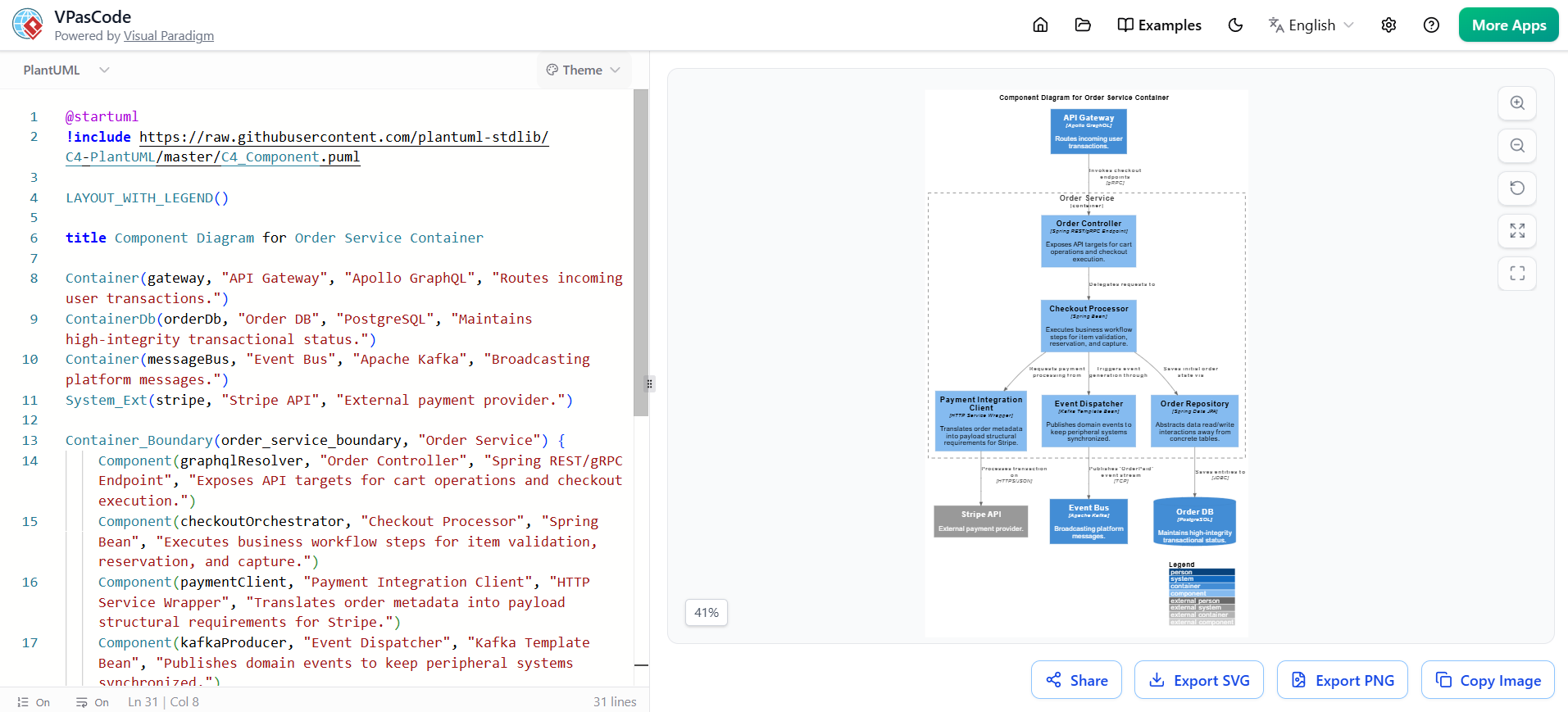
One of VPasCode’s strongest features is its ability to function as a unified hub for three industry-standard diagramming markup languages. Instead of forcing teams to choose one tool, it supports multiple engines optimized for specific modeling needs:
| Engine | Core Visual Strength | Common Use Cases |
|---|---|---|
| PlantUML | Rigid engineering standards & system boundaries | C4 Architecture models, strict UML Class/Sequence/Deployment diagrams, component mapping |
| Mermaid | Markdown integration & rapid documentation | Flowcharts, simplified sequence diagrams, state machines, timelines, Gantt charts |
| Graphviz | Relational logic & structural networks | Directed graphs (DOT), hierarchical mappings, dependency trees, mathematical networks |
This flexibility means that frontend teams using Mermaid for quick flowcharts and backend architects using PlantUML for complex system designs can collaborate within the same ecosystem.
3. User Interface & Workflow Design
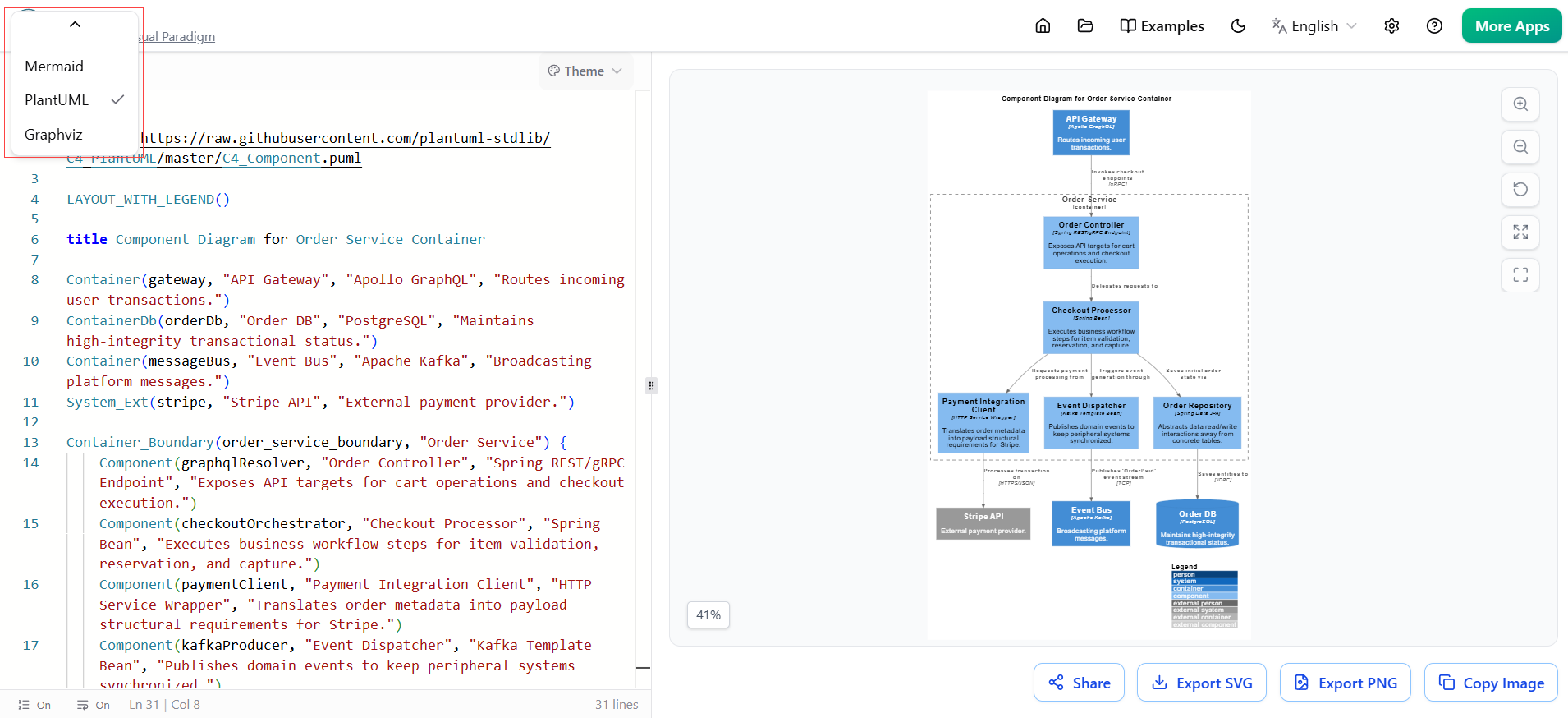
The VPasCode interface is engineered for real-time iteration, featuring a responsive two-column layout that balances code authoring with immediate visual feedback.
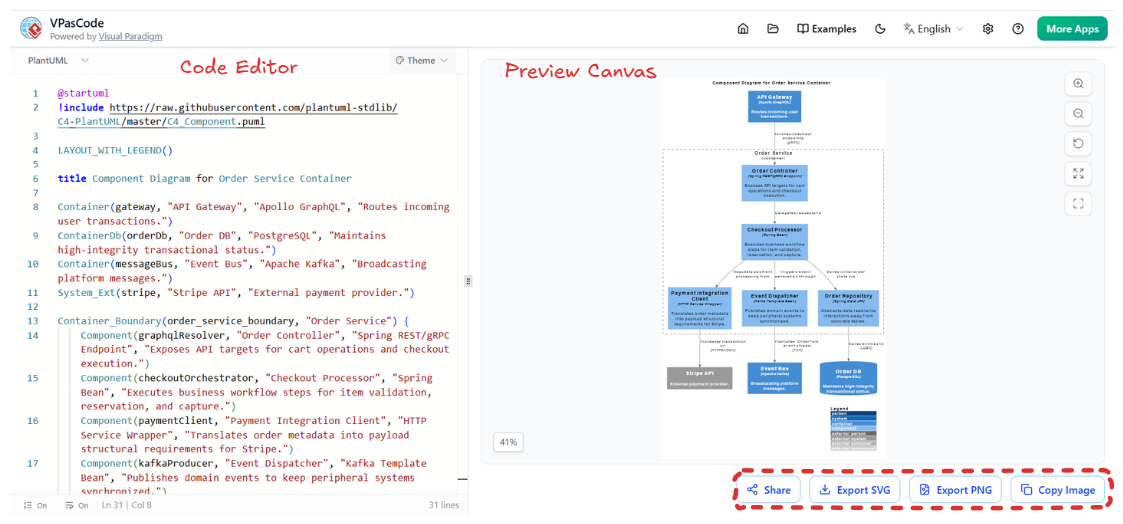
🖥️ Left Panel: Code Editor
-
Syntax Engine Selector: Instantly toggle between PlantUML, Mermaid, and Graphviz compilers.
-
Theme Customization: Adjust code highlighting palettes to match your preferred IDE or reduce eye strain.
-
IDE-Grade Features: Line numbering, intelligent indentation tracking, collapsible code blocks, and real-time cursor position (
Ln / Col). -
Live Status Bar: Continuous syntax validation with real-time error counting to catch typos and structural issues before rendering.
🎨 Right Panel: Interactive Preview Canvas
-
Vector Render Output: Instant, high-fidelity diagram rendering with zero lag.
-
Adjustable Split View: Draggable divider to dynamically resize the code and preview panes.
-
Canvas Control Toolbar: Floating vertical menu for zoom, pan, fit-to-screen, and full-screen immersion.
-
Zoom Context Indicator: Subtle percentage tracker to maintain design proportionality during navigation.
4. Smart Ecosystem Capabilities
Beyond basic rendering, VPasCode includes intelligent features that streamline the authoring experience and prevent common workflow friction:
-
Intelligent Code Validation & Auto-Hinting: The built-in syntax parser actively monitors input. If you paste code written for one engine while another is active (e.g., PlantUML syntax under the Mermaid compiler), VPasCode prevents compilation errors and displays a contextual warning. A single-click
“Wrong Diagram Type?”prompt automatically switches the active engine to match your pasted code. -
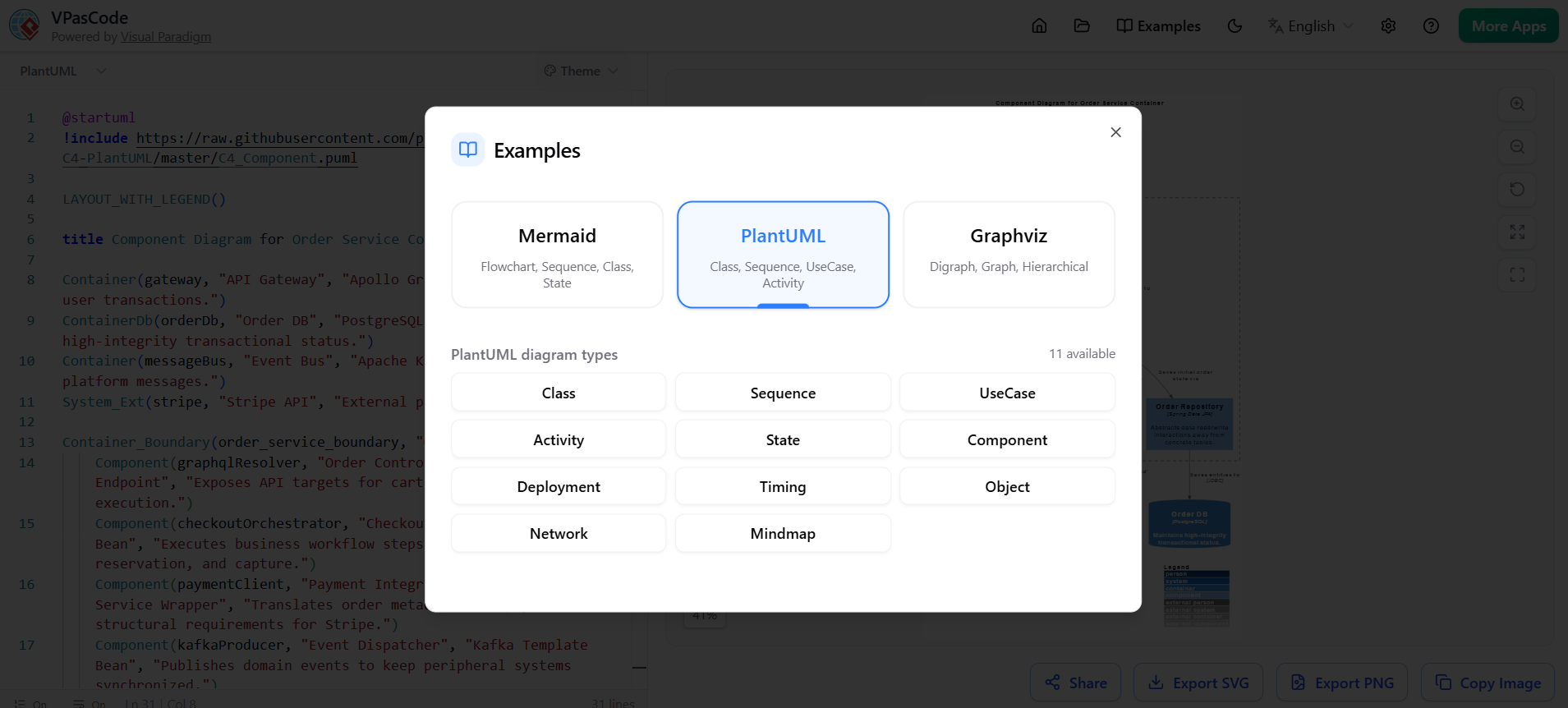
Dynamic Examples Library: Rapidly prototype with a built-in template engine offering ready-to-use structures across all three engines. The library includes 11+ curated PlantUML templates (Class, Sequence, Activity, Component, Object, Mindmap, and more), alongside Mermaid and Graphviz starters, eliminating the need to memorize syntax from scratch.
5. Collaboration & Export Workflows
Once your diagram is finalized, VPasCode provides seamless, one-click options to integrate visuals into documentation, presentations, or team communication channels:
-
🔗 Share: Generate persistent, collaborative hyperlinks for real-time peer review and stakeholder feedback.
-
📐 Export SVG: Download resolution-independent vector graphics, ideal for web platforms, technical publications, and scalable documentation.
-
🖼️ Export PNG: Generate rasterized images optimized for internal wikis, slide decks, and standard document formats.
-
📋 Copy Image: Instantly copy the rendered diagram to your clipboard for direct pasting into Slack, Microsoft Teams, Jira, Confluence, or markdown editors.
Seamless Diagram-as-Code Integration
Reading a complex architecture guide like the C4 Model often leaves developers wanting to see how the underlying code behaves dynamically. Visual Paradigm addresses this by transforming static articles into interactive sandboxes through integrated “Edit in VPasCode” hyperlinks.
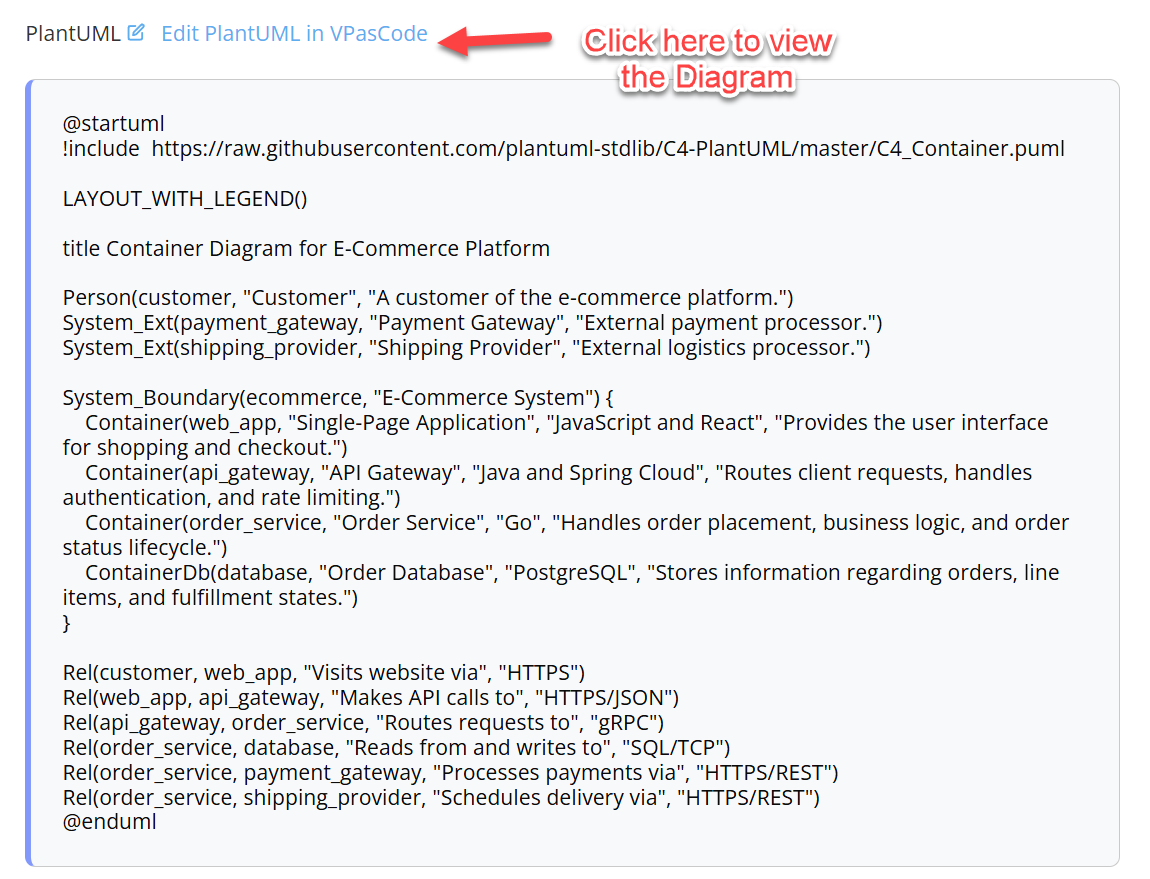
As seen in the case study, clicking the “Edit PlantUML in VPasCode” link directly above an architecture code block instantly migrates the snippet into the live rendering environment.
Key Benefits of One-Click Code Migration
This friction-free bridge between technical documentation and code execution provides several significant advantages:
-
Eliminates Copy-Paste Friction: You do not have to highlight extensive code strings, handle formatting bugs, or accidentally lose indentation layouts during manual transfers.
-
Instant Visual Context: In a single click, abstract C4 text models manifest into high-fidelity, interactive vector diagrams.
-
Immediate Experimentation: Developers can instantly use the article’s structure as a living template, modifying boundaries, adding new microservices, or shifting database variables on the fly.
-
Accelerated Technical Training: Eliminates setup friction, allowing new team members to learn complex syntax mechanics directly from production-ready templates.
AI Capabilities & Advanced Features
For teams looking to accelerate their workflow further, VPasCode offers advanced artificial intelligence features, particularly in its premium tiers:
-
Prompt-to-Diagram: Users can write prompts in plain English to instantly output a ready-to-render code script, lowering the barrier to entry for those unfamiliar with syntax.
-
AI Code Error Fixing: Premium tiers offer syntax validation to instantly flag errors and automatically repair broken markup, saving valuable debugging time.
-
AI Language Translation: Automated translation capabilities allow global engineering squads to swap text content languages instantly, facilitating better collaboration across international teams.
-
Direct OpenDocs Integration: The secure “Send to OpenDocs Pipeline” ships diagrams directly into documentation workspaces with one click, ending the tedious process of manual PNG tracking and file management.
Feature & Capability Structure
The platform divides its core tools between accessible community utilities and advanced enterprise additions, making it suitable for both individual contributors and large organizations:
| Feature Tier | Included Tooling Elements | Licensing & Framework Availability |
|---|---|---|
| Free / Community Capabilities | Text code editor, live engine previewing, public URL link sharing, SVG/PNG graphic exports. | Accessible natively via the cloud portal or browser integration dashboards. |
| Premium / AI Additions | AI Code Error Fixing engine, prompt translation scripts, direct automated OpenDocs documentation pipeline syncing. | Available on Visual Paradigm Online (Combo Edition) or Desktop Professional tiers. |
Conclusion
VPasCode redefines technical diagramming by merging developer-friendly code workflows with professional-grade visual output. By supporting PlantUML, Mermaid, and Graphviz under one roof, it eliminates tool fragmentation while enforcing consistency, version control, and rapid iteration.
For product managers and engineering leaders, the value proposition is clear: diagrams that stay in sync with the codebase, reduce manual maintenance overhead, and facilitate better collaboration through shareable, version-controlled assets. Whether you’re documenting microservices, mapping system dependencies, or creating onboarding architecture guides, VPasCode ensures your diagrams remain as maintainable, reviewable, and collaborative as your actual codebase.
If you are tired of outdated Visio files and disjointed documentation, VPasCode offers a modern, efficient alternative that fits seamlessly into the DevOps lifecycle. It is not just a diagramming tool; it is a productivity multiplier for technical teams.
References
-
Comprehensive Guide to VPasCode by Visual Paradigm: A detailed overview of VPasCode’s core features, multi-engine support, and user interface design.
-
VPasCode Features Overview: Highlights the key capabilities of VPasCode, including its browser-based nature and integration with Visual Paradigm’s ecosystem.
-
Mastering VPasCode: The Ultimate Guide to AI-Powered Diagram-as-Code with Multi-Engine Support: Explores advanced AI features and multi-engine functionality for enhanced diagramming efficiency.
-
Case Study: Accelerating Software Architecture Documentation with VPasCode: Real-world application of VPasCode in speeding up architecture documentation processes.
-
Introducing Visual Paradigm 18.1: A New Era of Unified Ecosystems and AI-Driven Innovation: Announces new AI-driven features and ecosystem integrations in Visual Paradigm 18.1.
-
VPasCode Overview: Official overview page detailing the purpose and capabilities of VPasCode.
-
How the Visual Paradigm AI Chatbot and VPasCode Function as an Integrated Ecosystem for Diagramming: Explains the synergy between VPasCode and Visual Paradigm’s AI chatbot for streamlined diagram creation.
-
Introducing Visual Paradigm 18.1: A New Era of Unified Ecosystems and AI-Driven Innovation: Blog post discussing the latest innovations in Visual Paradigm, including AI enhancements.
-
Visual Paradigm Online: Access point for Visual Paradigm’s online suite, including VPasCode.
-
From Diagram to Documentation: A Beginner’s Guide to the Visual Paradigm Pipeline: Guide on integrating diagrams into broader documentation workflows using Visual Paradigm tools.
-
Seamlessly Connect Diagramming to Documentation: VPasCode Integrates with OpenDocs: Details the integration between VPasCode and OpenDocs for streamlined documentation pipelines.
-
From Code to Clarity: A Beginner’s Guide to Seamless Diagramming with VPasCode and OpenDocs: Introductory guide on using VPasCode and OpenDocs together for efficient diagramming and documentation.
Related posts:
 From Text to Visuals: A Hands-On Review of VPasCode for Modern Engineering Teams
 UML Modeling in Agile Development: The AI and Diagram-as-Code Revolution
Enhancing State Machine Design: How Visual Paradigm’s AI-Powered State Diagram Generator Revolutionizes Visual Modeling
UML Tutorial with AI-Powered Visual Modeling
UML Modeling in Agile Development: The AI and Diagram-as-Code Revolution
Enhancing State Machine Design: How Visual Paradigm’s AI-Powered State Diagram Generator Revolutionizes Visual Modeling
UML Tutorial with AI-Powered Visual Modeling