


Introduction
As a product manager and tech enthusiast who frequently relies on visual models to communicate complex system architectures, I have always had a love-hate relationship with “diagram-as-code” platforms. On one hand, treating diagrams as text allows for seamless version control and integration into our CI/CD pipelines. On the other hand, the slightest syntax error—a missing bracket, a misplaced semicolon, or a simple typo—can instantly break the preview. This forces me to abandon my creative flow and spend valuable time hunting through lines of text just to figure out what went wrong.
Recently, I decided to give VPasCode a try, specifically to test out their newly introduced AI Code Error Fixing feature. After spending a week integrating it into my daily workflow, I want to share my hands-on experience with this tool and explore how its intelligent engine is tackling one of the biggest hurdles in text-based diagramming.
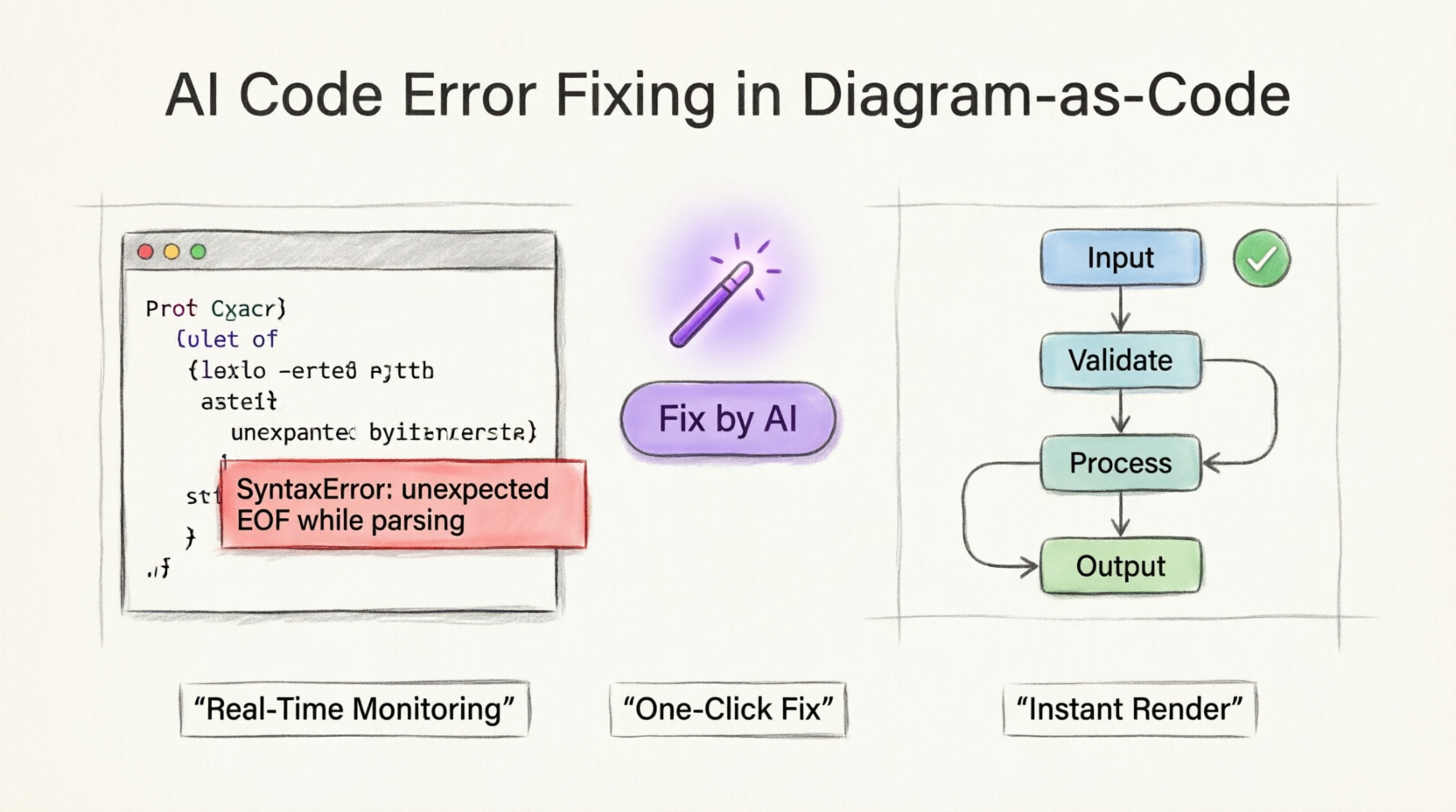
The Core Experience: A Frictionless Diagramming Environment
Before diving into the new AI error fixer, it is worth noting the foundation that VPasCode is built upon. Operating entirely as a cloud-native, web-based tool, it requires zero local installation or complex environment configurations.
In my experience, the platform shines in its Multi-Engine Syntax Support. I was able to natively write code using PlantUML, Mermaid.js, and Graphviz all within a single sandbox. The Real-Time Preview feature is incredibly responsive, instantly rendering my text inputs into professional visual layouts as I type. Whether I was building complex enterprise software architectures, charting intricate sprints, or organizing vast data clusters, the comprehensive diagram library handled everything from Sequence Diagrams and ERDs to C4 Models and Mind Maps without breaking a sweat.
Furthermore, the platform treats diagrams as pure text files, making them inherently Git-friendly. This means my architecture diagrams can be version-controlled, easily searched, and seamlessly maintained alongside our project source code.
The Game Changer: One-Click Syntax Healing
The true star of the show, however, is the new AI Code Error Fixing tool. VPasCode monitors syntax in real-time, and the moment a code error prevents a diagram from rendering, the platform shifts from a blank screen to an assistive troubleshooting mode instantly.
Here is how the automated workflow repaired my broken scripts during my testing:
-
The Rendering Error: When my script contained an error (such as a missing opening bracket
{), the diagram viewer immediately displayed a “Failed to Generate Diagram” warning block. This overlay helpfully detailed the suspected error type and the exact line number. -
Triggering the AI: Instead of manually scanning my code line-by-line, I simply clicked the purple “Fix by AI” button located right inside the error overlay.
-
The Auto-Fix: The AI instantly cross-referenced my diagram type’s syntax rules against my active code. It isolated the issue, generated the correct solution, and automatically injected the healthy, corrected code straight back into my editor.
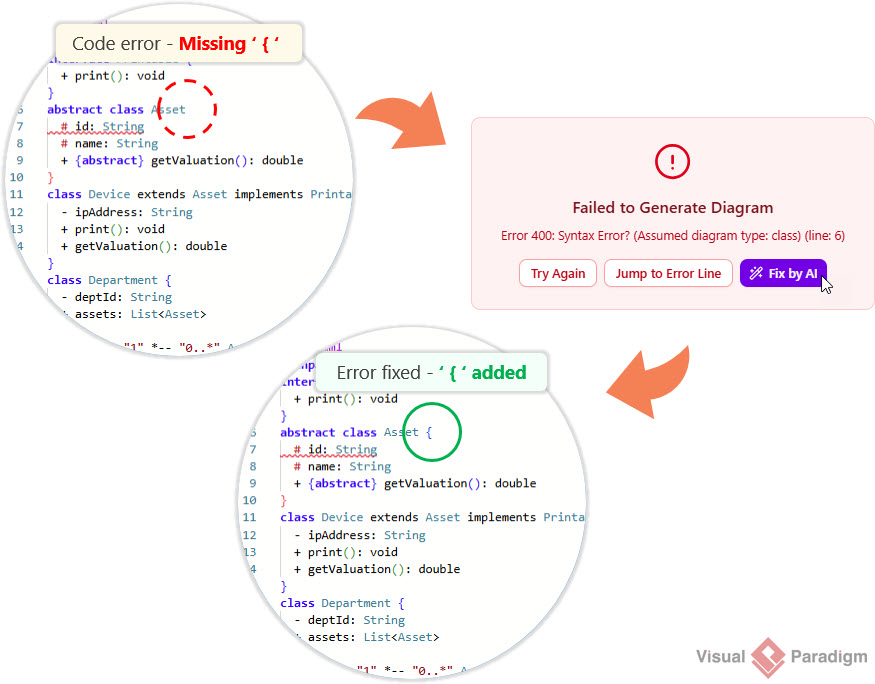
As soon as the AI applied the fix, my diagram instantly re-rendered properly on the screen. The experience was nothing short of magical. There was no guesswork, no tedious debugging, and absolutely no interruptions to my creative momentum. It felt like having a senior developer looking over my shoulder, instantly correcting my typos.
Feature Availability and Access
It is important to note that the AI Code Error Fixing tool is a premium capability designed to maximize engineering productivity. During my review, I found it included as a paid feature within the following packages:
-
Visual Paradigm Online Combo Edition (or higher).
-
Visual Paradigm Desktop Professional Edition (or higher) with an active maintenance plan.
A Friendly Reminder for Desktop Users: If you are already running Visual Paradigm Professional Edition (or higher) and have active maintenance, you actually have full access to the web apps included in the VP Online Combo Edition. This means you can simply log into VPasCode and start using the “Fix by AI” tool right now without purchasing an additional tier.
Beyond Syntax: AI Innovations and Collaboration
While the error fixer was the main attraction, my time with VPasCode revealed several other powerful features that elevate the platform from a simple code editor to a comprehensive diagramming ecosystem.
The platform offers impressive AI-Driven Features as premium add-ons. Beyond fixing errors, the Natural Language Generation allowed me to describe system requirements in plain English and watch as it automatically produced clean, structured code scripts. Additionally, the AI Diagram Translation feature was a lifesaver for our international teams, instantly translating and updating text labels within the underlying script to support multiple languages natively.
On the collaboration front, VPasCode excels. I could generate collaborative URLs to share live diagram environments directly with my colleagues for quick feedback. When it was time to finalize our documentation, the High-Resolution Vector Export allowed me to download visual layouts as scalable SVG files or crisp PNG images.
Most impressively, the OpenDocs Integration connected my layouts straight to Visual Paradigm’s AI knowledge management platform. Instead of manually re-uploading images every time a diagram changed, I could push updates live to our documentation with a single click.
Conclusion
After thoroughly testing VPasCode and its new AI Code Error Fixing capabilities, I can confidently say that it has fundamentally changed how I approach diagram-as-code. The frustration of syntax errors—a pain point that has plagued text-based diagramming for years—has been effectively neutralized.
The platform’s ability to monitor syntax in real-time and deploy an intelligent, one-click auto-fix solution ensures that a simple typo never slows down your workflow. Combined with its robust multi-engine support, zero-installation cloud environment, and seamless integration with documentation pipelines, VPasCode proves that diagramming can indeed be fast, frictionless, and highly productive.
If you are tired of letting syntax errors break your creative momentum, I highly recommend heading over to VPasCode. Write your ideas freely, and let their integrated AI assistant handle the code syntax compliance for you.
References
- VPasCode – Text-to-Diagram Platform | PlantUML, Mermaid …: The official feature page for VPasCode detailing its core capabilities, multi-engine support, and AI-driven features.
- Mastering VPasCode: The Ultimate Guide to AI-Powered Diagram-as-Code with Multi-Engine Support: A comprehensive guide on mastering the VPasCode platform, focusing on AI-powered diagram-as-code workflows and multi-engine support.
- Comprehensive Guide to VPasCode by Visual Paradigm: An in-depth documentation guide covering the complete feature set and usage instructions for the VPasCode platform.
- Introducing VPasCode: The Ultimate Unified Text-to-Diagram Platform: The official release announcement introducing VPasCode as a unified, cloud-native text-to-diagram platform.
- Introducing Visual Paradigm 18.1: A New Era of Unified Ecosystems and AI-Driven Innovation: Release notes for Visual Paradigm 18.1 highlighting the new unified ecosystems and AI-driven innovations across the platform.
- Introducing Visual Paradigm 18.1: A New Era of Unified Ecosystems and AI-Driven Innovation: A blog post discussing the launch of Visual Paradigm 18.1 and its focus on unified ecosystems and AI capabilities.
- Revolutionizing Diagram Maintenance: How VPasCode’s AI Auto-Fix Eliminates Syntax Frustrations: A detailed guide explaining how the new AI auto-fix feature resolves syntax errors and streamlines diagram maintenance.
- Visual Paradigm Online: The main web portal for accessing Visual Paradigm’s suite of online applications, including VPasCode.
- Break Language Barriers Natively with VPasCode’s New AI Diagram Translation: Release notes introducing the AI diagram translation feature designed to support international development teams.
- From Code to Clarity: A Beginner’s Guide to Seamless Diagramming with VPasCode and OpenDocs: A beginner-friendly guide on leveraging VPasCode and OpenDocs integration for seamless diagramming and documentation workflows.
- VPasCode Overview: The official overview page for VPasCode, outlining its core functionalities as a text-to-diagram platform.
- Seamlessly Connect Diagramming to Documentation: VPasCode Integrates with OpenDocs: Release notes announcing the direct integration between VPasCode and OpenDocs to streamline the diagram-to-documentation pipeline.
