


Introduction
If you’ve ever struggled to explain a complex software system to stakeholders, developers, or new team members, you know the pain of architecture documentation. Traditional diagrams often become outdated quickly, lack consistency, or fail to communicate the right level of detail to the right audience. Enter the C4 Model—a lightweight, hierarchical approach to visualizing software architecture that has gained significant traction in the developer community.
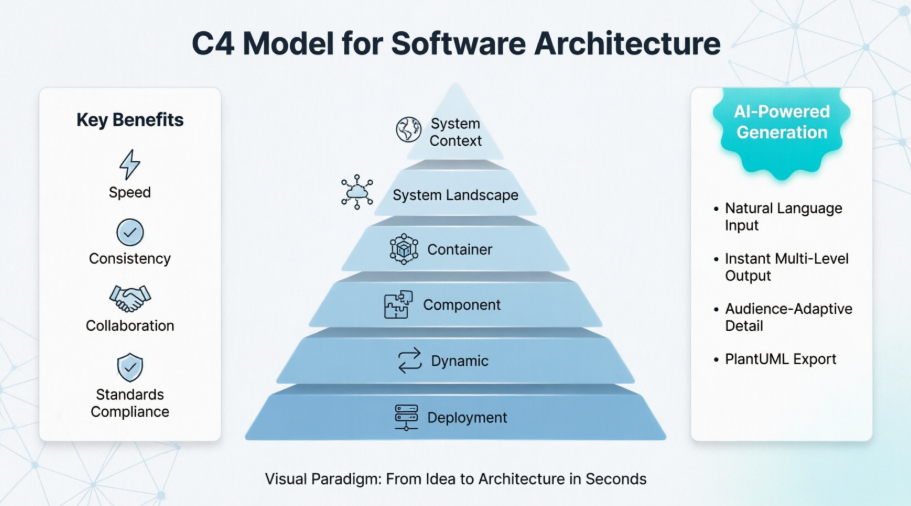
In this hands-on review, I’ll share my experience exploring Visual Paradigm’s comprehensive C4 Model tooling, from traditional manual diagramming to their newly launched AI-powered generation features. Whether you’re a seasoned enterprise architect or a developer documenting your first microservice, this guide walks through what works, what impresses, and how to get the most value from these tools in real-world projects.
Understanding the C4 Model: A Quick Refresher

The C4 model, created by Simon Brown, provides a simple, scalable framework for describing and visualizing software systems through four progressive levels of detail:
-
Context: The big-picture view showing your system as a black box and its relationships with users and external systems.
-
Container: Breaks the system into deployable units like web applications, mobile apps, databases, or microservices.
-
Component: Zooms into individual containers to show their internal building blocks and interactions.
-
Code: (Optional) Links diagrams to actual code structures for implementation-level clarity.
Beyond these core levels, modern C4 practice often includes three additional diagram types for comprehensive documentation: System Landscape (portfolio-level view), Dynamic (interaction sequences), and Deployment (infrastructure mapping). Together, these six views create a complete architectural narrative adaptable to any audience.
My Experience with Visual Paradigm’s C4 Tooling
Traditional Modeling: Precision and Control
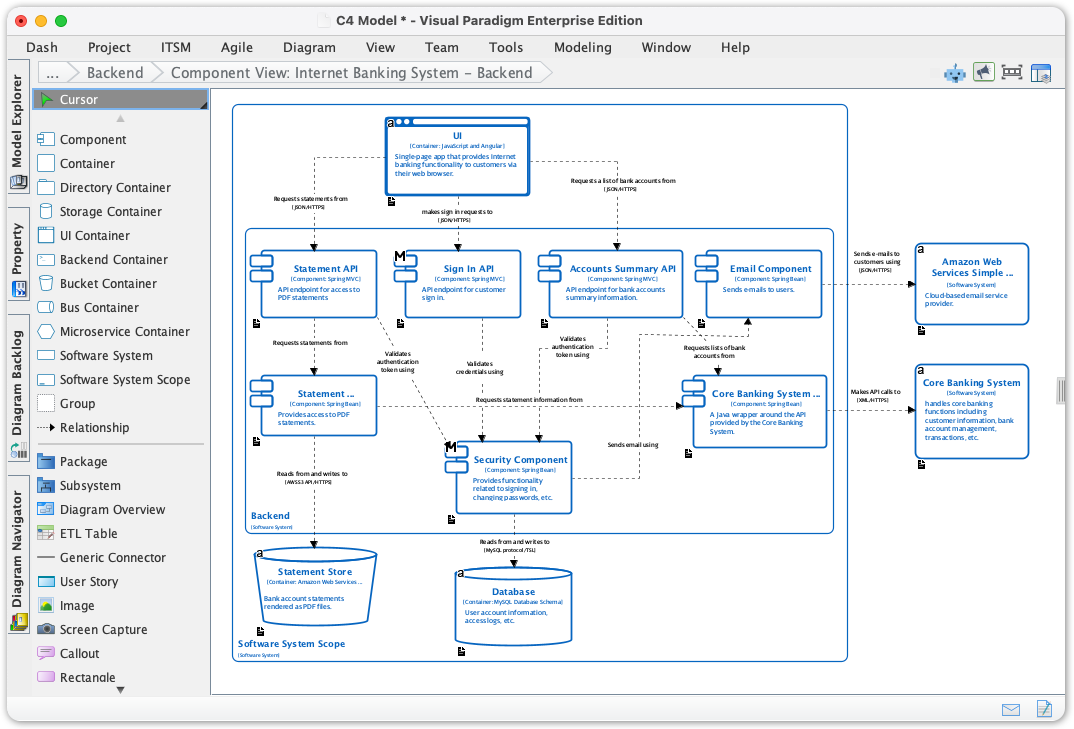
Starting with Visual Paradigm Desktop, I appreciated the dedicated C4 palette and shape library. Creating diagrams felt intuitive—dragging a “Person” or “Software System” element automatically applied C4-compliant styling. The resource-centric interface let me define elements once and reuse them across multiple diagrams, ensuring consistency.
The “sweeper” layout tool was a standout feature for cleaning up messy diagrams with a single click, while inline property editing kept my workflow uninterrupted. For teams needing deep modeling capabilities, the ability to drill down from a Context diagram into nested Container or Component sub-diagrams provided excellent traceability.
Visual Paradigm Online offered a compelling alternative for distributed teams. The browser-based editor loaded quickly, supported real-time collaboration with commenting and version history, and included a rich library of pre-built C4 templates. Exporting to PDF, PNG, or JPG made sharing with non-technical stakeholders seamless.
AI-Powered Generation: The Game Changer
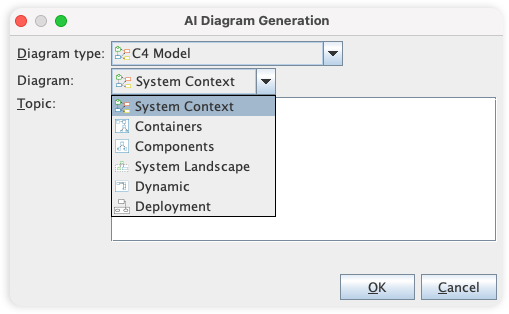
The real revelation came with Visual Paradigm’s AI Diagram Generator. Instead of starting from a blank canvas, I simply described my system: “An e-commerce platform with user authentication, product catalog, shopping cart, Stripe payment integration, and PostgreSQL database.” Within seconds, the AI generated a complete suite of C4 diagrams—properly scoped, logically connected, and styled to C4 conventions.
What impressed me most was the contextual intelligence:
-
Selecting “System Context” produced a high-level view focused on external actors and systems.
-
Switching to “Components” automatically decomposed containers into logical modules with clear responsibilities.
-
The AI adjusted terminology and detail level based on my selected audience (General Readers vs. Engineers).
The integrated AI chatbot allowed iterative refinement through natural language: “Add a Redis cache layer to the product service” or “Show the payment failure retry sequence.” Changes propagated intelligently across related diagrams, maintaining architectural consistency without manual rework.
The Six C4 Diagram Types in Practice
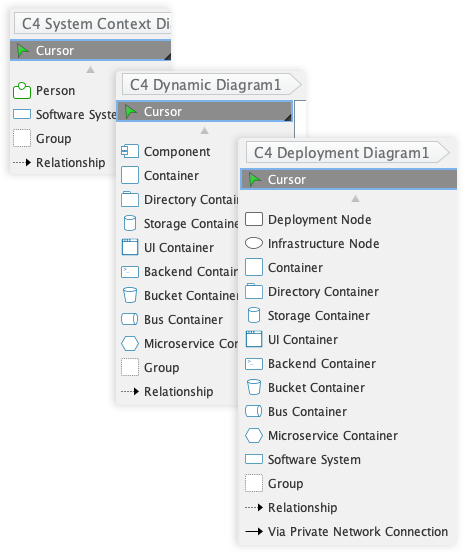
Visual Paradigm supports all six essential C4 diagram types. Here’s how each serves a distinct purpose in my workflow:
System Context Diagram
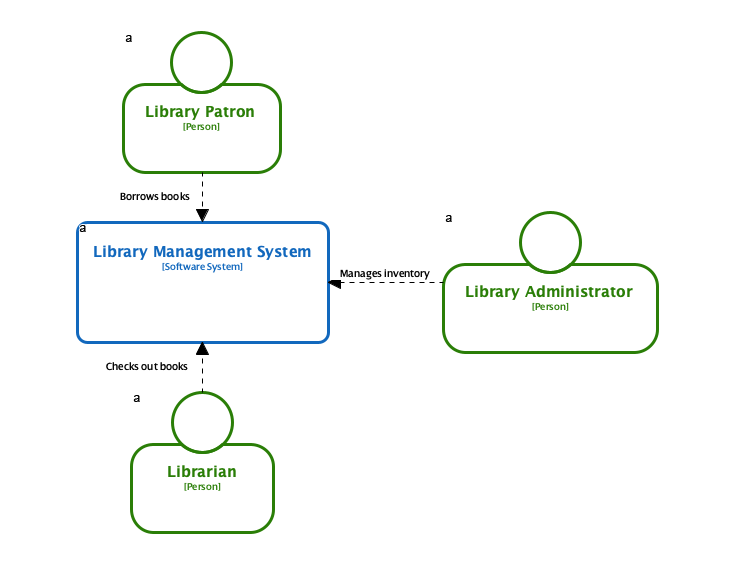
Perfect for executive briefings or onboarding, this view shows your system’s boundaries and key external relationships without technical complexity.
Container Diagram
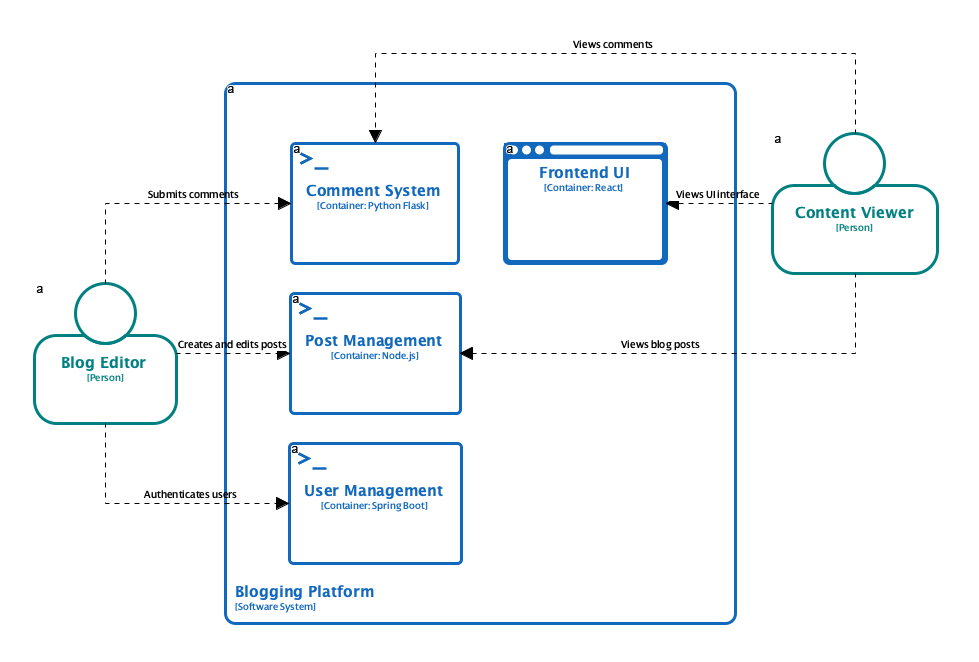
Ideal for engineering leads, this decomposes the system into deployable units, clarifying technology choices and integration points.
Component Diagram
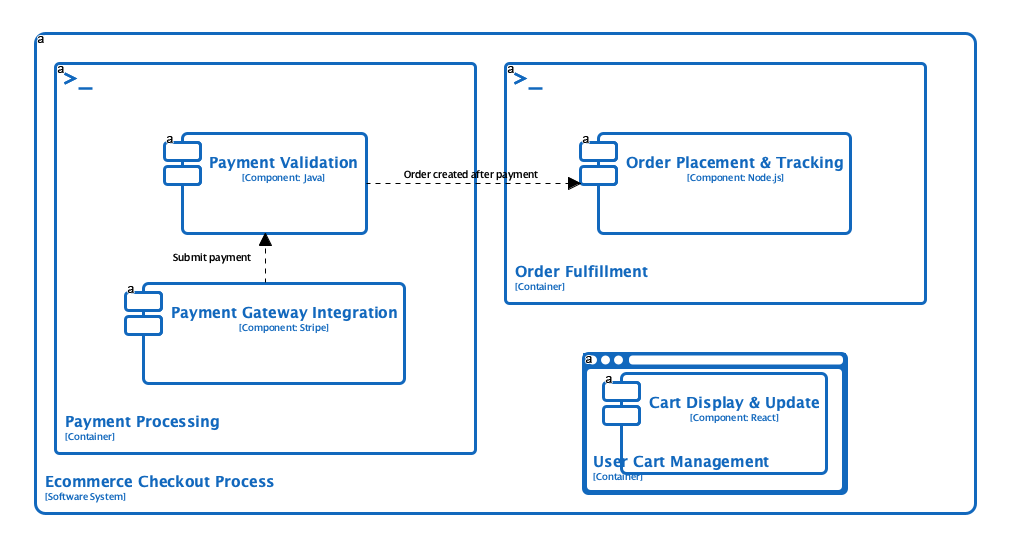
For developers implementing features, this zooms into container internals, mapping responsibilities and dependencies at the code-module level.
System Landscape Diagram
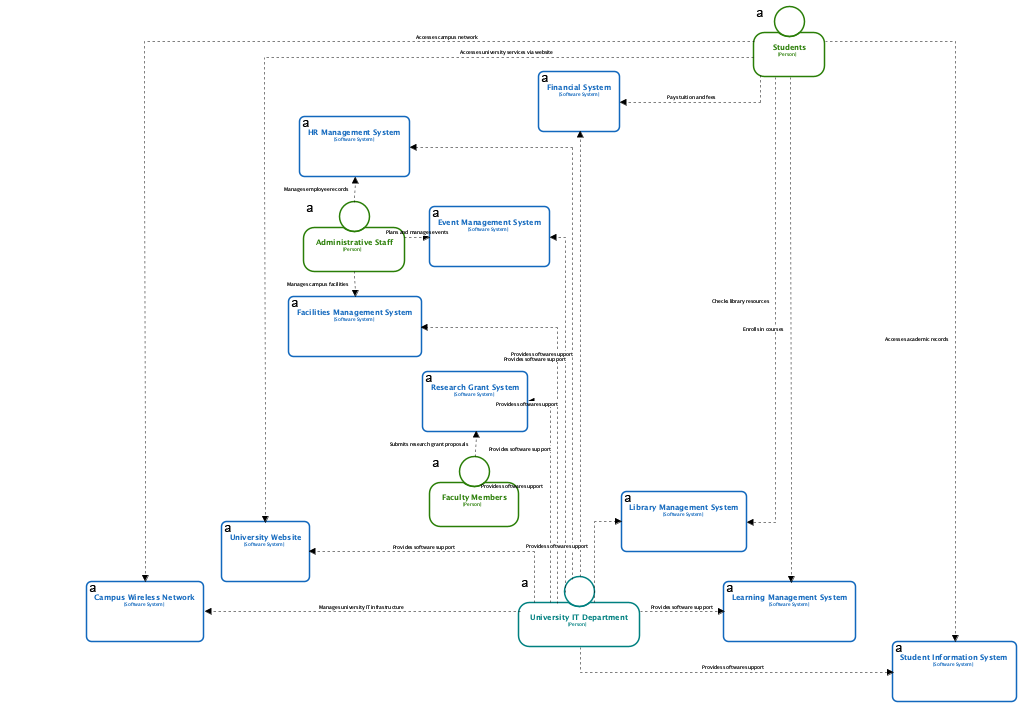
Useful for portfolio management, this shows multiple systems and their relationships across an organization’s technology ecosystem.
Dynamic Diagram
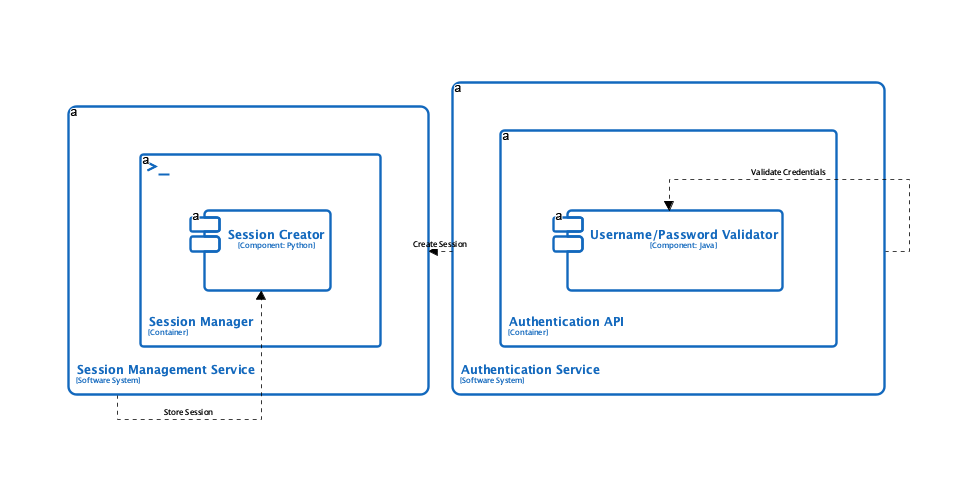
Critical for troubleshooting or designing workflows, this illustrates interaction sequences and data flows between components over time.
Deployment Diagram
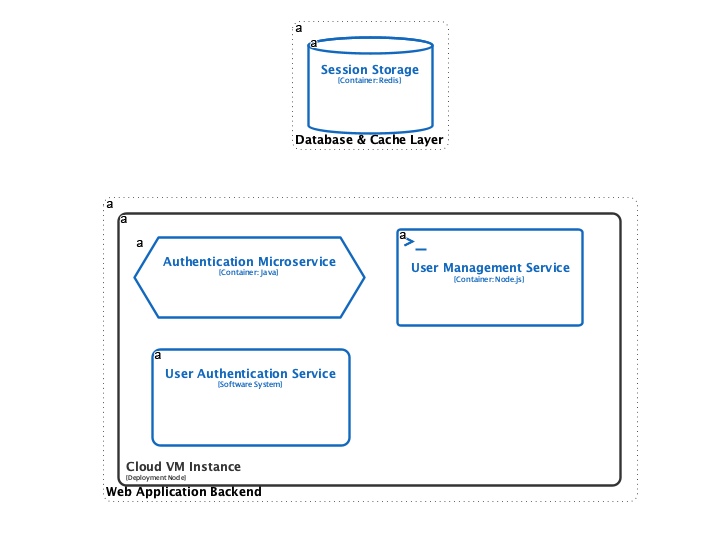
Essential for DevOps and infrastructure teams, this maps containers to physical or cloud infrastructure nodes, networks, and environments.
Workflow and Accessibility: Getting Started
Accessing these capabilities is straightforward:
-
Visual Paradigm Desktop: Available in Professional Edition or higher. Navigate to Tools > AI Diagram Generation > C4 Model, select your diagram type, enter a topic description, and generate.
-
Visual Paradigm Online: Available to Combo Edition users or higher via the AI C4 PlantUML Studio, which combines AI generation with markdown-style editing and PlantUML code export for version control.
The unified workflow lets you switch between diagram types while maintaining element consistency. For teams adopting C4 incrementally, starting with Context and Container diagrams before expanding to Components or Deployment views proved an effective strategy.
Strengths and Considerations
What Works Well:
-
Speed to Value: AI generation transforms hours of manual diagramming into seconds, accelerating documentation cycles.
-
Standards Compliance: Automatic adherence to C4 conventions reduces learning curves and ensures professional output.
-
Audience Adaptation: Tailoring detail levels for different stakeholders improves communication effectiveness.
-
Collaboration Ready: Real-time editing, commenting, and export options support distributed team workflows.
-
Future-Proofing: PlantUML export enables diagram-as-code practices for CI/CD integration.
Points to Consider:
-
AI-generated diagrams benefit from human review to validate architectural decisions and business logic.
-
Advanced customization may require familiarity with C4 principles to refine AI outputs effectively.
-
Edition requirements mean teams should evaluate licensing needs against feature requirements.
Conclusion
After hands-on exploration, Visual Paradigm’s C4 Model tooling stands out as a mature, versatile solution for modern architecture documentation. The combination of traditional precision modeling and innovative AI-powered generation addresses the full spectrum of user needs—from architects requiring granular control to teams seeking rapid prototyping capabilities.
What truly elevates this toolkit is its focus on communication. By supporting six complementary diagram types and audience-aware generation, it helps bridge the gap between technical implementation and stakeholder understanding. The AI features don’t replace architectural thinking; they amplify it by removing repetitive drafting work and letting professionals focus on design quality and validation.
For teams evaluating C4 adoption or seeking to modernize existing documentation practices, Visual Paradigm offers a compelling path forward. Start with a single diagram type, leverage AI for initial scaffolding, and iteratively expand your architectural narrative. The result: clearer communication, faster onboarding, and architecture documentation that actually stays useful as systems evolve.
References
-
Visual Paradigm C4 Diagram Tool Solution: Overview of Visual Paradigm’s comprehensive C4 modeling solution for software architecture documentation.
-
Visual Paradigm Desktop Full C4 Model Support Release: Announcement of complete C4 Model diagramming support in Visual Paradigm Desktop with six essential diagram types.
-
AI Diagram Generator: Complete C4 Model Release: Introduction of AI-powered C4 diagram generation covering all six C4 views for accelerated architecture documentation.
-
Visual Paradigm Online C4 Model Tool: Cloud-based C4 modeling features including templates, collaboration tools, and export options for team-based architecture design.
-
Visual Paradigm C4 Diagram Tool Features: Detailed feature showcase of Visual Paradigm’s C4 modeling capabilities including symbol libraries and diagram types.
-
Comprehensive Guide to the C4 Model with Visual Paradigm Tooling: Third-party guide exploring C4 Model implementation using Visual Paradigm’s tooling ecosystem.
-
Beginner’s Guide to C4 Model Diagrams: Entry-level tutorial for understanding and creating C4 Model diagrams for software architecture visualization.
-
AI-Powered C4 PlantUML Markdown Editor Release: Launch of AI-enhanced PlantUML editor for generating version-controllable C4 diagrams from natural language descriptions.
-
AI-Powered C4 PlantUML Studio: Web-based studio for creating C4 diagrams using AI and PlantUML with markdown-style editing.
-
Leveraging Visual Paradigm’s AI C4 Studio: A Comprehensive Guide: Independent review and walkthrough of using Visual Paradigm’s AI C4 tools for efficient architecture documentation.
-
C4 Model Tutorial Video: Video demonstration of C4 modeling techniques and Visual Paradigm tool usage.
-
Visual Paradigm Knowledge Base: C4 Modeling: Official knowledge base article covering C4 modeling workflows and best practices in Visual Paradigm.